

Table of Contents
Introduction
In this article I am going to tell you how the Internet works. I am going to tell you also what exactly you need to do in order to open a website. I am going to explain you the main terms – what is what, in a way you are going to understand it.
After you read this, you’d be able to open your own website in a matter of minutes. You’ll know what actions you’d need to undertake and how long it would take you to do that.
Let’s go.
What do you need
In order to have your own presence online, you need:
- Your own domain name
- Your own hosting provider
- You need to set up your DNS records
There are plenty of other small things to do, but these are the 3 general conditions to have a website.
To understand what are these things, I need to explain you how the Internet works.
How the Internet works?
The basics of the Internet are quite simple, actually.
Websites consist of webpage. Everyone has seen a webpage. These are those shiny, colorful pages that we open on our computers and our phones every day and we read the content on them.
What is WEBHosting?
The webpages and the websites are hosted (located) on special webservers. Webpages are files where all of the information you see in your browser is collected and then shown to you. These files are called HTML files and have extensions HTM or HTML. The extension shows the programming language used – HTML, or Hypertext Markup Language.
So, webpages are files that are located on the webservers.
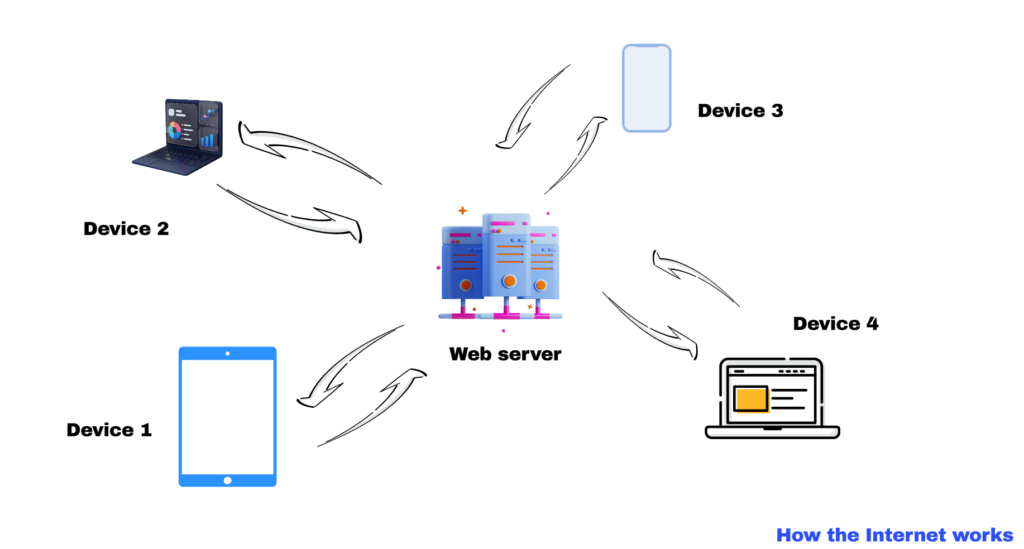
We use browsers to request those webpages from webservers. Browsers download copies of the files from the webservers and display them to us in a form of webpages.
Usually, one webserver hosts many websites. This is called “Shared hosting”. The webserver can serve many browsers, thus, many users. One site can serve many users simultaneously as well.
Here is a schematic how this works:
Internet addresses
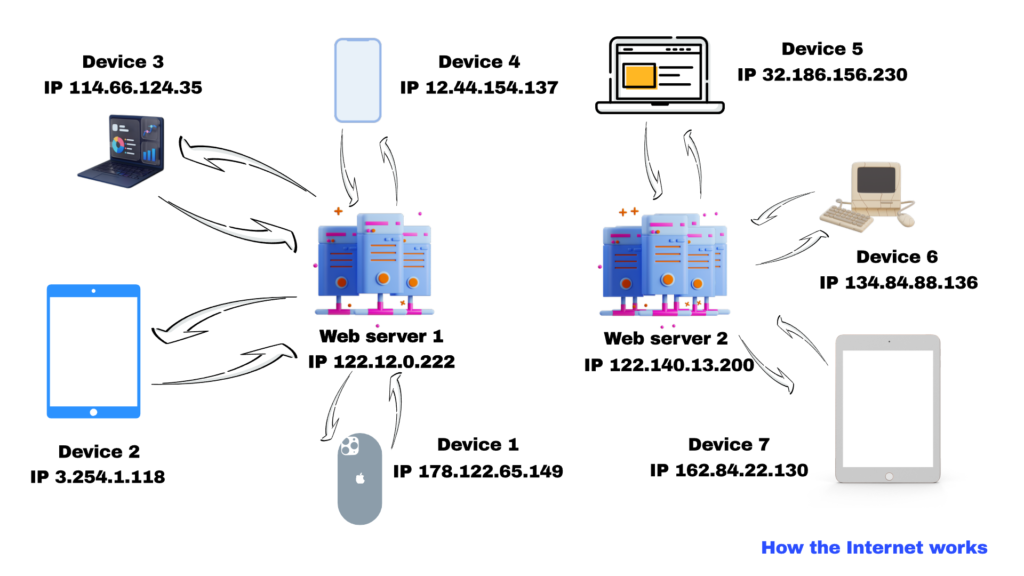
Any entity in the Internet has its own unique address. Because the protocol for Internet communication is called TCP/IP, or Transmission Control Protocol/ Internet Protocol, the addresses of Internet entities are called “IP addresses”, or “Internet Protocol Addresses”.
These are the famous 4-groups numbers addresses like 160.223.180.146. This address is real purely random, which means it exist and there is a computer, network or a server assigned to it. This is an address from IP version 4. There is a new version that has 6 groups of numbers and that offer a much larger number of Internet addresses.
The range of the numbers in a group varies between 0 and 255. Which is to say, an address like 780.450.290.330 can’t exist.
Any Internet participant has an IP address assigned. Any computer, smart phone, tablet, server, smart home, smart air conditioner, any participant in the Net has its own IP address.
On the other hand, any hardware device has its own hardware address, one assigned to it by its producer. This hardware address is called MAC address, or Medium Access Control address. Together with the IP address, they create a very unique set of addresses that could describe in an exact manner any Internet participant.
Here is how the situations changes with the IP addresses added:
DNS system – the Yellow pages of the Internet
Now, when we know how devices communicate between each other on the Internet, we need to see how exactly this happens.
Computers are very good with numbers, but we, humans, prefer dealing with words and names.
The Yellow pages used to connect our names with our phone numbers. Now the same function is performed by our smart phones. In our contact lists, there are the names of our contacts and against them – their phone numbers. That way, we don’t have to remember all of these numbers. If we want to call someone, we just enter her name and then hit “Call”. And we call that person.
Exactly the same way, the Internet need similar system to simplify the communication between humans and machines. And the DNS system was created.

What is DNS and how it works
So, what is DNS?
DNS stands for Domain Name System. What is a domain?
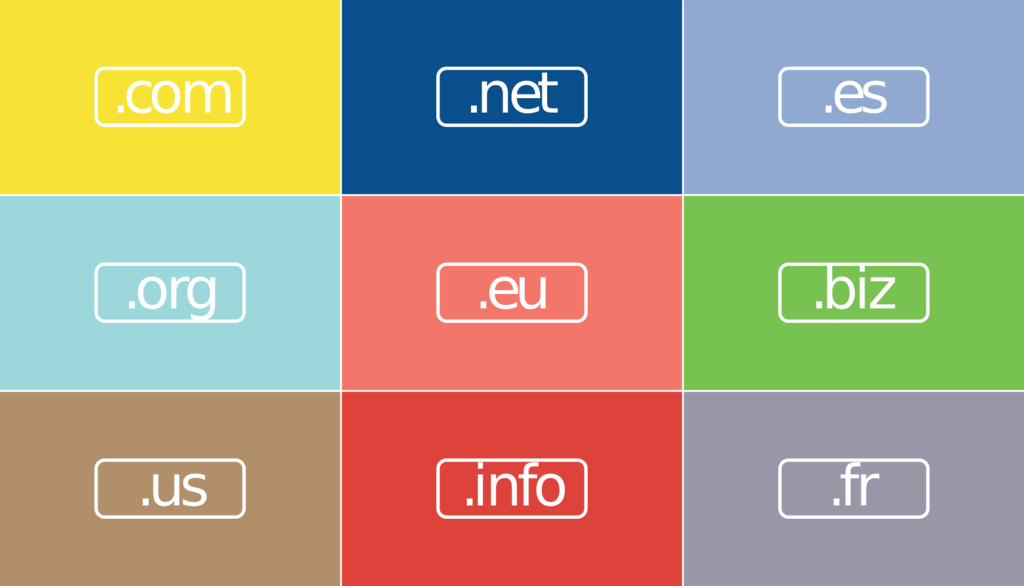
I suppose everyone has an idea of how the sites’ names are shown on the Internet. There is a site name, then a dot and then something other like “com”, “net” or “org”. Like “yoursitename.com”
The string on the high right part of the name is called “domain name of first level”. There is a special server which keeps records of all of the sites’ names that are associated with that first level domain.
In the dawn of the Internet, there were only a few domain levels of first level, like the ones I already shown you. The most popular were .com, that were associated with “commercial” businesses, the .org that were associated with organizational or non for profits organizations, there were the .net organizations, that also were associated with non for profits etc.
The word that is on the left of that first level domain, the one that usually represents your business name is called “a domain name of second level”. This is what everyone who wants to have an online presence must purchase. This is what is now understood when we say “I bought a domain for my business”. The second level domain.
We purchase our domain by organizations called “domain registrars”, or simply “registrars. These are organizations like GoDaddy, Namecheap or Squarespace. In order to buy our own domain we need first to check it out whether it is not already busy (bought by someone else).
If the name is free, we simply put an order for the desired domain and once we pay for it, that precise name become ours. Nobody can buy it or reserve it any more.
In the past, the most popular amongst businesses was the .com domain. Any respectful business was supposed to have a .com domain. Of course, with time most useful names got taken and people started to struggle to get the right domain name for them.
How, it is still respectful to use a .com domain. However, in addition to the first few domains of first level that existed before, there are more than 1,000 other domain names of first level and it is much easier to choose a domain close to your business name.
“Resolving” the address
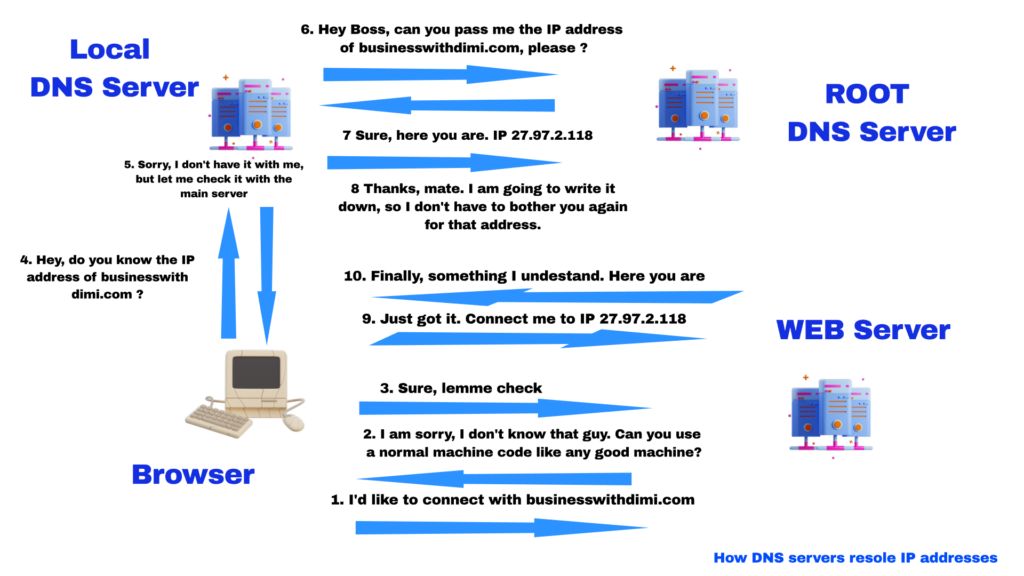
So, when you put the site name in the address bar of your browser, the computer needs to translate the name into an IP address. The term used for that is called “resolving” the address, or “the browser needs to resolve the address”.
To resolve an address, we need a special DNS server. There are a few different types of such servers. For simplicity reasons, we are going to show only 2 of them – the “Local” DNS server and the “Root” DNS server.
In the “Root” server are kept all of the domains second level of the root type. For example, in the .COM root server you can find all of the second level domains that are associated with that first level domain. In the .NET root server – all of the second level domain names associated with the .net first level DNS etc. I hope you get the idea.
The local DNS is exactly that – this is a DNS that is located somewhere close to your computer – usually, on a special location with your ISP – Internet Service Provider. This is the organization that brings to you the Internet.
When your browser needs to resolve an Internet address, the first thing it does is to connect that local machine. If it finds information for the address on this machine, it resolves the address and contact the remote machine. If not, the local machine connects the respective ROOT DNS server to find that information. Then, the local DNS stores the acquired info on its own memory ready for further use.
On the local DNS there is information about many different domains – all that have been requested from the ROOT DNS so far. And the next time someone requests this information, there is no need to get to the ROOT servers. That way the system saves time and resources when executing requests.
You can read more about the DNS system here.
You can see all of this illustrated on the picture below.
How in practice to setup website and to connect it to the Internet
After we have all of the theory, let’s see how it all works in practice and what you need to do in order to connect your site to the Internet.
1. buying a hosting space
You buy hosting space for your website by different hosting providers. There are hundreds of such providers around the world. The hosting provider is an extremely important factor of your Internet presence and that’s the reason you need to very carefully choose it.
The provider must be one with really good reputation, providing high level service with minimal down time (the time your website is not online). The provider must provide a good support in case you need it and must provide excellent security services (against hackers and spammers).
The provider must also provide all of the other services that go with the web hosting – like email servers and email accounts, different web applications and services like Softaculos and tools for administration of the account.
Finally, all of this must be at a reasonable price.
Overall, the choice of a web hosting provider is not an easy task.
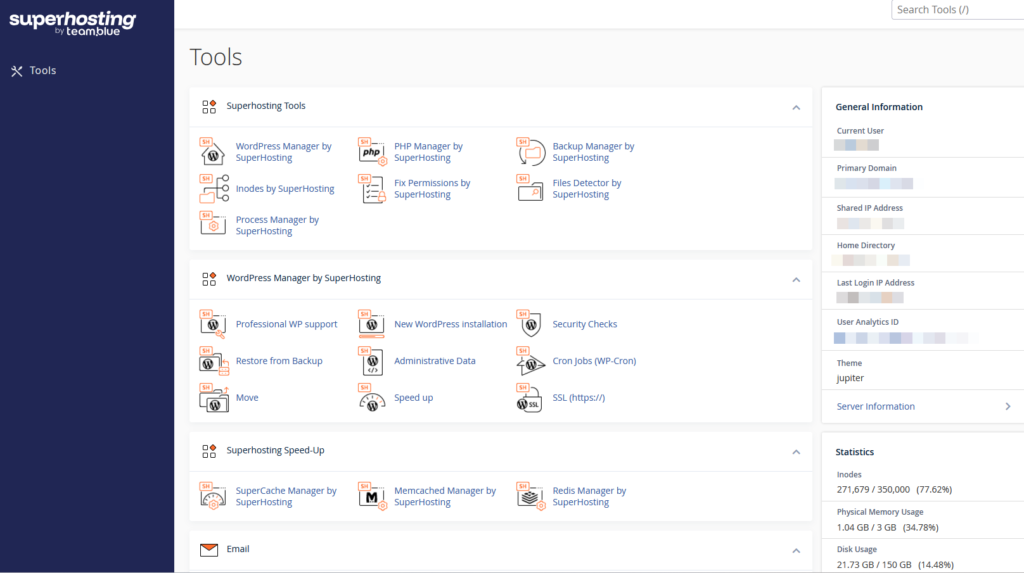
The main interface for control of your web hosting is usually the CPanel. Here’s a picture of it;
There are other interfaces, of course and the one that is coming to my mind here is the HPanel. This panel has been created and used by Hostinger – one of the biggest (and the best in my opinion) hosting providers. It looks like that:
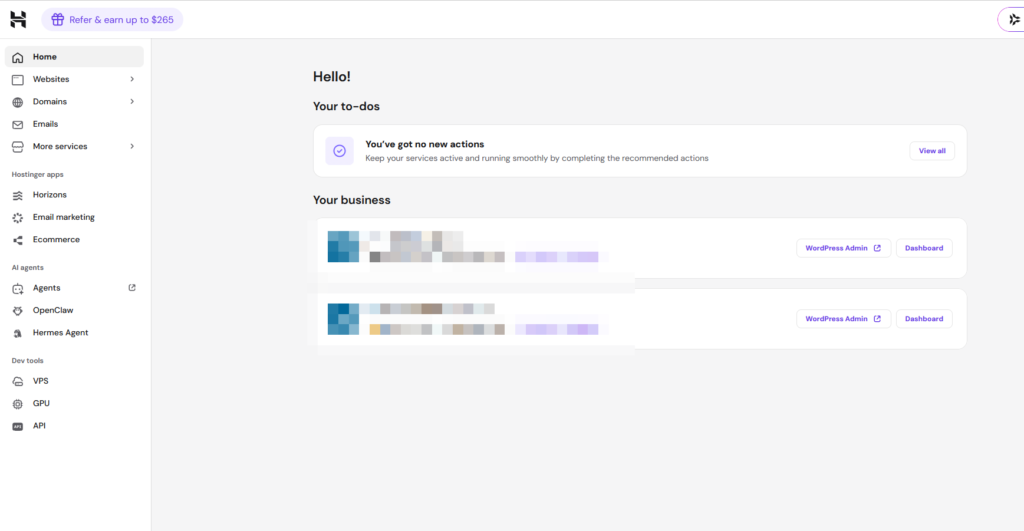
No matter what the interface it, its main functionalities are the same. They are just represented in a different way. There could be added or omitted some special tools specific for any different hosting provider.
2. Buying a domain name for your business/organization
Once you have acquired your hosting space, you need to buy a domain name for your site. As we already talked, this is a domain name second level. This is also an extremely important task, as this is going to be the name that people are going to see when they look for you.
It must be short and easy to remember (remember how we, people are better with words instead of numbers) and the domain must be the right one (here, for businesses, the .COM domains are still considered the best option).
Overall, the choice of a domain could take some time and some research to find the right one for you that is not yet taken by someone. Finding the right one for .COM domains could be especially challenging as this is the oldest fist name domain and the demand for .COM domains is especially high.
You can by the domain by your hosting provider, however, I prefer to do this by the special organizations we talked about – the domain registrars. There are a few reasons about that – first, these organizations usually offer the best process, then they offer a very good way to keep in order all of your domains and finally, they offer some other very useful services, related to the domains.
Anyway, this is a question of a personal choice and in the end, you can always transfer your domain from one registrar to another, in case you don’t like the services of the first one.
3. Connecting the local DNS servers with the ROOT DNS servers
Finally, in order to make your site visible, you need to connect your local Internet services with the ROOT servers. That way, the ROOT DNS server would know where to find you site.
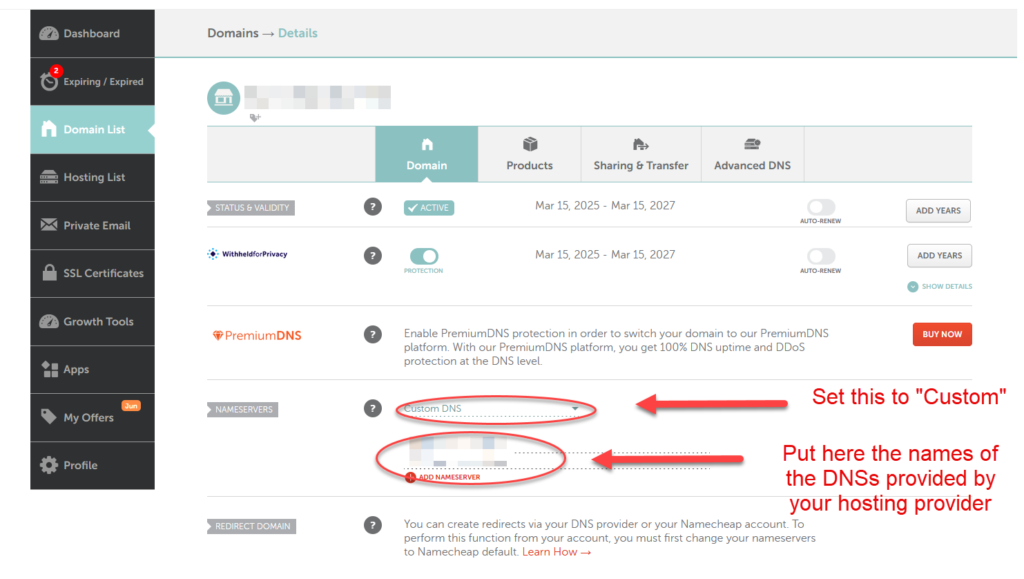
In order to do so, you need to go to your registrar – that is, the company you bought your DNS domain name and to add there the local DNS servers, provided by your host provider.
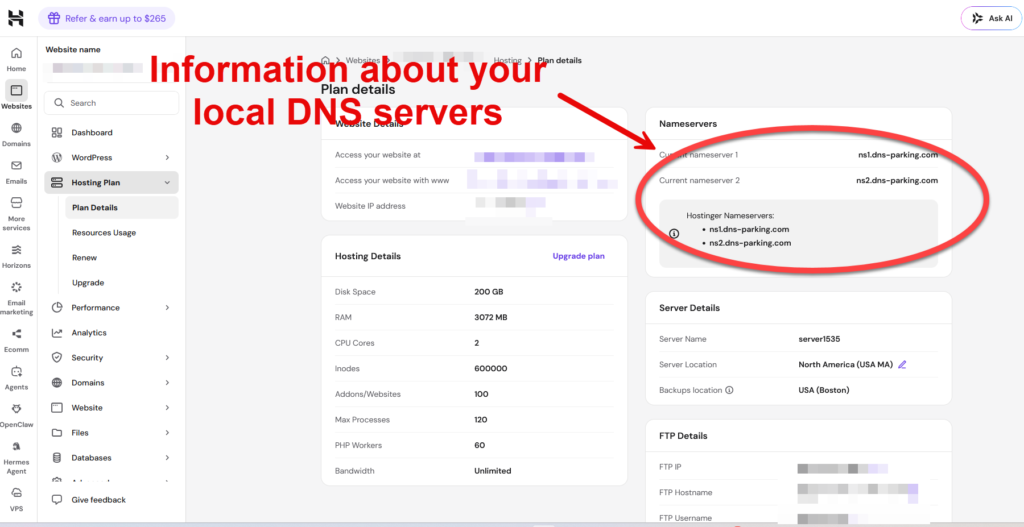
When you create your hosting account with your hosting provider, along with the access to the CPanel, you get tons of other useful information, including the IP addresses of a couple of DNS servers.
In general, you only need one server – and this is the first one in the list. The second one is a backup solution – in case for some reason the first one stops working.
Here is how this is done. I am using a Hostinger as a hosting provider and the DNS servers could be found here:
I usually buy my domain names from Namecheap, so to connect the local DNS servers with the ROOT ones, I need to put their addresses here:
Of course, you need to do all of the above in case you buy your domain names from one provider and use another one for hosting your websites. If, however, you use the same provider for both hosting your website and buying your domain names, you don’t have to do any of this. It is all done automatically by the provider.
There are many providers that offer such a combined service. To name a few, these are Go Daddy and Hostinger. Again, where exactly to buy your services is entirely a question of a personal choice.
What I prefer, however, is to use different providers. This is because there is already a very high level of specialization between different service providers and that means some company simply provide better and cheaper services that others in certain domains.
And this is it. This is all you need to know in order to open your own website.
In conclusion:
In this article I’ve shown you all of the steps you need to go through in order to open your own website. I tried to reduce the technical slang to minimum, so all of those terms don’t confuse you. I also simplified a bit the theory here and there, again, not to get too technical.
I also explained the main elements of the Internet, how they interact between each other and ultimately, how the whole system functions. I tried not to get very deep in the theory, because you don’t need all of this in order to understand and to setup your own website.
I am putting, however, some locations where you can go and learn more about this whole thing, in case you are interested. There is nothing wrong to get more knowledge if you want so.
In some of the following articles I am going to show you in more details how to buy a domain name, how to buy webhosting space and how to link all together. I am going to put the links of these articles here.
If you want to understand more about this site, please visit this page, where I have prepared a more detailed description of the aims of this blog.
I hope you liked the material here. If you have any questions, you can comment here, or get in touch with me through some of the forms I have put throughout the site.
I’d be happy to answer them.